

A Companion Guide to Essential USB Accessories: Troubleshooting Made Easy
We’ve all heard the phrase "it just works" when it comes to consumer technology. In today’s fast-evolving digital landscape, it’s reasonable to expect our phones, tablets, and computers to function seamlessly right out of the box. Yet, as many of us know from experience, the reality can be far from ideal. Troubleshooting has become an integral facet of our engagement with technology, especially for enthusiasts. While we’ve delved into software tricks for Windows 11 and explored how to decipher the antics of USB devices, hardware complications can present a whole different set of challenges. Enter three essential USB accessories that can help troubleshoot common tech problems efficiently and affordably.
USB-C to DC Charging Kit
Charge Almost Any Electronic Device with One Interchangeable Cable
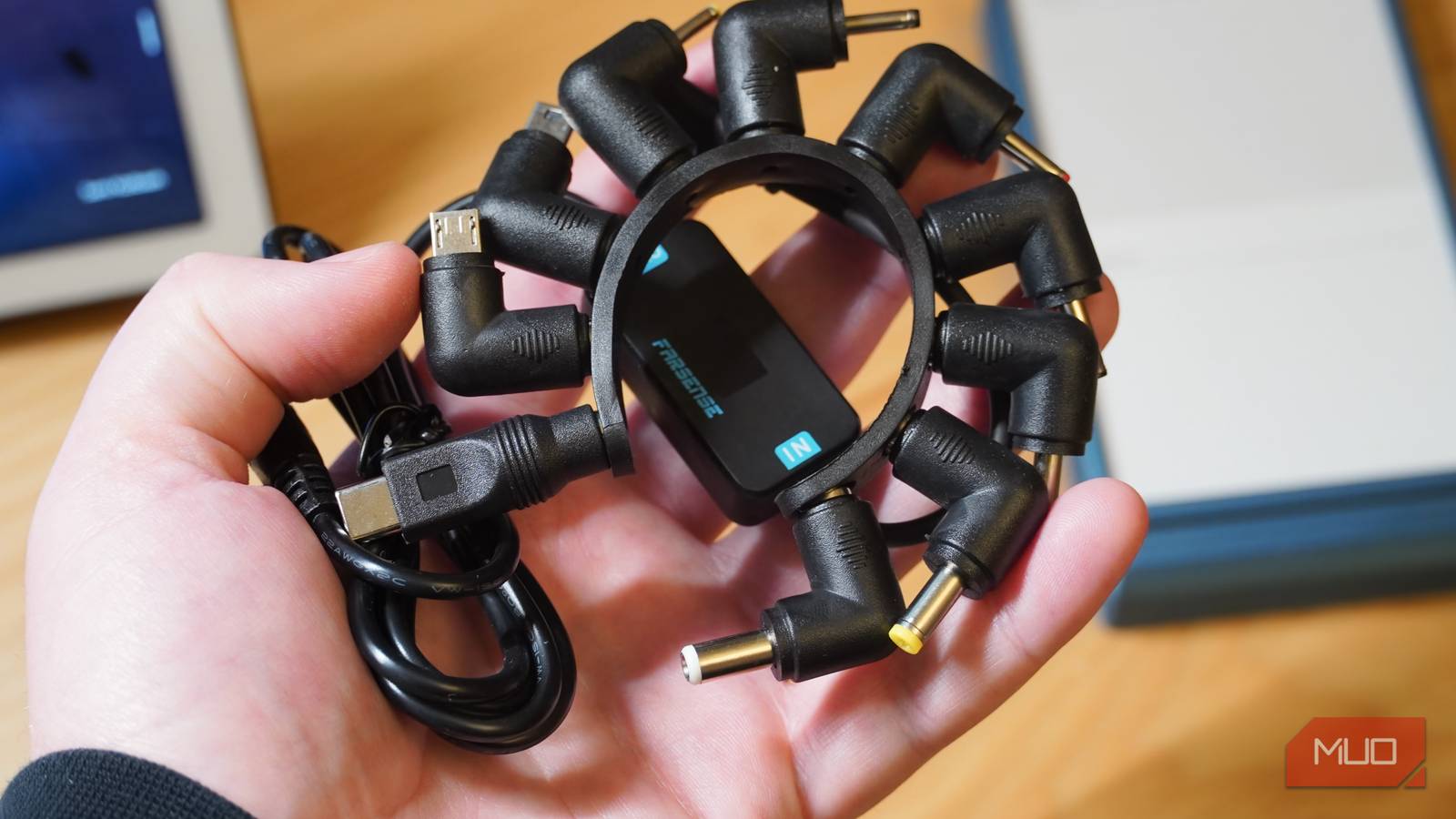
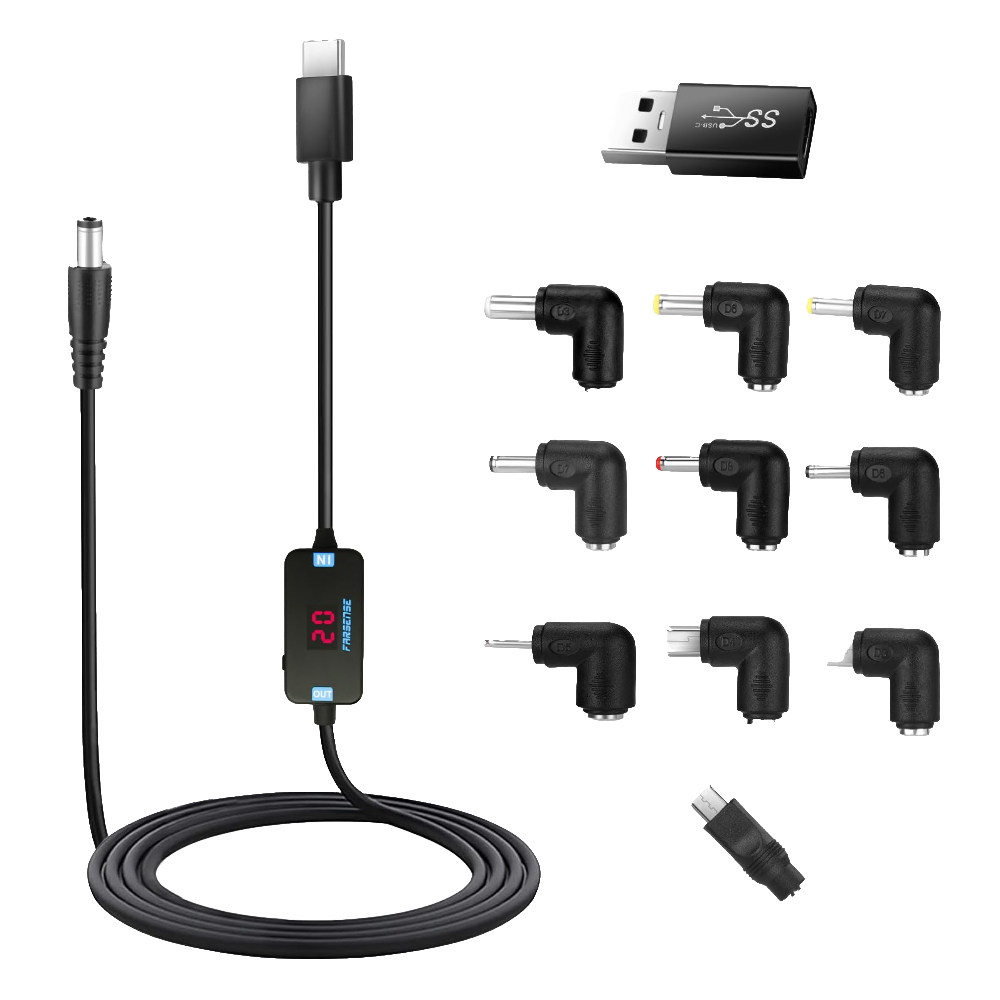
When it comes to versatile troubleshooting tools, the Farsense USB-C to DC charging kit sits at the top of my list. Priced at around $13, this accessory tackles multiple issues, starting with the compatibility of charging cables. It includes interchangeable tips for USB-C, Micro USB, and Mini USB, along with seven barrel jack sizes that can power a variety of devices — from laptops and monitors to numerous home appliances.
Imagine having the ability to power multiple devices using only one cable type. The setup allows for a customizable charging experience, featuring a built-in voltage trigger. With voltage options at 5V, 9V, 12V, 15V, or 20V, it meets the specific power requirements of each device, thereby minimizing the risk of damage. Using the wrong voltage charger, especially for laptops, can lead to overheating or general instability.
This kit, compact enough to fit in your hand, effectively replaces up to ten individual chargers. The convenience it offers is invaluable, especially when you’re uncertain about the charging specifications of your devices. Avoiding overvoltage or undervoltage mishaps becomes significantly easier, protecting your electronics from potential damage.
USB-C to Gigabit Ethernet Adapter
Fall Back to a Reliable Wired Connection When You Need It Most
In a world where wireless connectivity is king, there are still times when Wi-Fi just won’t cut it. For those situations, a USB-C to Gigabit Ethernet adapter is a savior. I rely on this tech accessory to bypass issues with underperforming Wi-Fi networks, having experienced it firsthand with my Gigabit internet service and Wi-Fi 6E mesh system.
This particular adapter offers a three-port hub that includes an integrated cable and a Gigabit Ethernet port. In addition, three USB 3.0 Type-A ports allow for maximum connectivity. The benefits of having a wired connection are clear: downloading large applications swiftly and ensuring stability during critical tasks. Switching over to a wired connection has cut my download times significantly, especially when it comes to hefty files like games that exceed 100GB.
Although it may be the priciest of the trio at $40, this StarTech 3-port adapter is worth every penny. It boasts features like Wake-on-LAN, Jumbo Frames, and VLAN tagging — all while adhering to IEEE 802.3 standards, making it a robust addition to anyone’s tech toolkit.

USB-C Cable with LED Display
Verify Your Charging Speed in Real Time
Another must-have accessory in my arsenal is the SOOPII USB-C cable, which has withstood the test of time over the past four years. At only $10, this cable has accompanied me on numerous journeys, proving its durability and performance. Unlike typical USB-C cables, the SOOPII cable features a built-in LED display that shows the current charging wattage in real time, transforming it into a diagnostic tool.
Understanding whether a power adapter or portable charger is the weak link in your charging setup can often save hours of troubleshooting. This cable primarily supports 100W USB Power Delivery fast charging, enabling you to ensure that your devices are charging at peak capacity.
Due to differences in charging speed throughout a device’s battery lifecycle—initially fast but gradually slowing down to avoid overheating—having real-time wattage data helps in understanding the charging process and adjusting your approach accordingly.

Why You Need These Cheap Gadgets in Your Bag
Tech enthusiasts, casual users, and everyone in between can benefit tremendously from having these three budget-friendly accessories on hand. From diagnosing charging issues to ensuring reliable connections, the Farsense USB-C to DC charging kit, USB-C to Gigabit Ethernet adapter, and SOOPII USB-C cable with LED display help mitigate common problems that arise in our tech-driven lives.
Owning these tools means you’re well-equipped to tackle daily troubleshooting, saving precious time and ensuring your devices maintain optimal performance. After all, as we continue to embrace the conveniences of modern technology, being prepared is just as essential as enjoying the benefits it brings.